Postingan

πŸ“˜ How to Send Apache + ModSecurity Logs to AWS CloudWatch Logs on EC2

In this guide, you'll learn how to forward ModSecurity logs from Apache to AWS CloudWatch Logs using the CloudWatch Agent on an EC2 instance with an IAM Role , and ensure it runs reliably using systemd . ✅ Prerequisites An EC2 instance (Ubuntu/Debian) Apache2 and ModSecurity installed Instance has an IAM Role attached with permission: CloudWatchAgentServerPolicy or: { "Effect": "Allow", "Action": [ "logs:CreateLogGroup", "logs:CreateLogStream", "logs:PutLogEvents", "logs:DescribeLogStreams" ], "Resource": "*" } ⚙️ Step 1: Install the CloudWatch Agent cd /opt curl -O https://s3.amazonaws.com/amazoncloudwatch-agent/ubuntu/amd64/latest/amazon-cloudwatch-agent.deb sudo dpkg -i amazon-cloudwatch-agent.deb πŸ› ️ Step 2: Create the Agent Configuration File Save this file as /opt/cloudwatch-config.json : { "logs": { "logs_colle...
πŸ” How to Connect to Amazon RDS MySQL with IAM Authentication

Amazon RDS supports IAM-based authentication for MySQL. This means you no longer need to hardcode passwords in your code or scripts — instead, you generate a temporary IAM token securely. But setting it up can get tricky. In this guide, you’ll learn: ✅ How to configure IAM auth for MySQL ✅ How to grant user access ✅ How to import a .sql file securely ✅ How to fix common errors like ERROR 1045 and plugin not enabled ✅ Step 1: Enable IAM DB Authentication on Your RDS Instance Go to RDS Console > Your DB > Modify Scroll to "IAM DB Authentication" Set to ✅ Enabled Apply changes ( Apply immediately ) This allows your MySQL instance to accept login using IAM tokens. ✅ Step 2: Create a MySQL User with IAM Plugin Connect using the master user : mysql -h <rds-endpoint> -u <master-user> -p Create a new user (e.g. wordpress_db_user ) with IAM support: CREATE USER 'wordpress_db_user'@'%' IDENTIFIED WITH AWSAuthenticationPl...

Learning Haproxy Load Balancer with Podman and Go Backends

+------------------+          +-------------------+               +-------------------+ |   Client              |          |   Haproxy LB   |                |   Podman Pod   | | (e.g., Browser)  +   ---->      (Port 8181)    +---------->-------------------+ +------------------+          +---------+---------+                |                         |                                         |                                  ...

Cara Request Certificate ke Let's Encrypt

Mendapatkan SSL Gratis dari Let’s Encrypt Menggunakan Certbot Let’s Encrypt merupakan salah satu provider yang menyediakan sertifikat SSL gratis . Proses untuk mendapatkan sertifikatnya cukup sederhana. Untuk melakukan request sertifikat ke Let’s Encrypt, kita dapat menggunakan tool bernama Certbot . Pada tutorial kali ini, kita akan menginstall Certbot menggunakan Python virtual environment . Pastikan di laptop Anda sudah terinstall Python (versi dapat disesuaikan), kemudian jalankan perintah berikut. 1. Install Certbot Menggunakan Python Virtual Environment Buat virtual environment: python3.8 -m venv virtualenv Aktifkan virtual environment: source virtualenv/bin/activate Install Certbot menggunakan pip: pip3 install certbot 2. Proses Validasi Domain (DNS Challenge) Untuk mendapatkan sertifikat dari Let’s Encrypt, server Let’s Encrypt akan memvalidasi bahwa Anda benar-benar mengontrol domain tersebut menggunakan mekanisme ACME challenge . Terdapat beberapa metode challe...

Table of Contents

πŸ—BASIC IP & HOSTNAME Change hostname and FQDN on debian πŸ—„DIRECTORY SERVICES Import Bulk Users to AD from CSV file Install, Integration with OpenLDAP πŸ“šDNS Pembahasan IT Network Systems Administration Module A DNS (Forward Zone, Reverse Zone, CNAME, MX, Split View) πŸ”PUBLIC KEY INFRASTUCTURE / CERTIFICATES Microsoft Active Directory Certificate Services CA Web Enrollment How to make an CA, Intermediate CA / Sub CA, and Server Certificate with OpenSSL command How to make a root CA πŸ•ΈWEB SERVER Cara konfigurasi Web Server IIS di Windows Server Core dengan PowerShell How to configure HTTPS in IIS Windows Server via PowerShell Redirect IP ke domain, non-www ke www dengan htaccess di apache2 How to fix error “Could not reliably determine the server’s fully qualified domain name using 127.0.1.1 for ServerName" on apache2 πŸ“§MAIL SERVER Pembahasan LKS ITNSA MAIL IMAP SMTP Authentication LDAP Konfigurasi mail client Mutt Configure Postfix to use Gmail as a Mail Relay on Fedora Konfigu...

Cara Menggunakan NFTables untuk Firewall Server & Router

Gambar
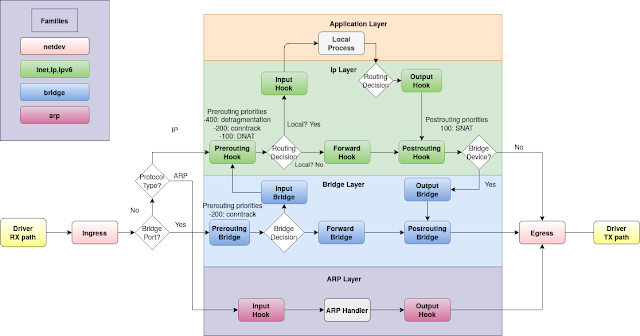
Diagram untuk memahami konsep nftables: https://wiki.nftables.org/wiki-nftables/index.php/Netfilter_hooks πŸ“Œ Apa itu NFTables? NFTables adalah firewall modern yang menjadi pengganti IPTables dalam framework Netfilter di Linux. Sistem ini menyediakan: Framework packet filtering yang lebih fleksibel Utility baru bernama nft Kompatibilitas dengan IPTables lama Integrasi dengan connection tracking, logging, dan queueing Netfilter NFTables dirancang agar lebih sederhana, efisien, dan mudah dikelola dibanding IPTables. πŸ“Œ Konsep Dasar NFTables Saat paket masuk ke server/router, paket akan melewati Netfilter Hooks , seperti: Prerouting → sebelum routing Input → paket menuju host Forward → paket diteruskan router Output → paket keluar dari host Postrouting → setelah routing Beberapa poin penting: ✅ Filtering Layer 2 atau Layer 3 bisa dipilih sesuai kebutuhan ✅ DNAT biasanya di Prerouting Hook ✅ SNAT biasanya di Postrouting Hook πŸ“Œ Chain yang Umum Digunakan Jika d...

How To make sure any file or folder created in /var/www/html gets automatically owned by www-data

Automatically Set Ownership to www-data Using incron If you want to ensure that any file or folder created inside /var/www/html is automatically owned by www-data , you can use incron . Incron works similarly to cron, but instead of running based on time schedules, it monitors filesystem events such as: File or directory creation File modifications Attribute changes File deletions Step 1 — Install incron Install incron using: sudo apt-get install incron Step 2 — Allow Root to Use incron By default, not all users are allowed to use incron. You must explicitly grant permission. Open the file: sudo vim /etc/incron.allow Add the following line: root Save and exit. Step 3 — Configure incrontab Edit the incrontab for root: sudo incrontab -u root -e Add this line: /var/www/html IN_CREATE /bin/chown -R www-data:www-data /var/www/html/ Save and exit. How It Works With this configuration, whenever a new file is created inside /var/www/html , its ownership will auto...