Postingan

Main ICMP dengan IPTables
Gambar
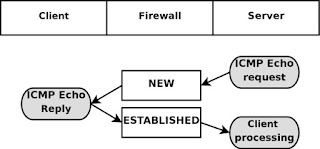
Jika ingin  hostA bisa ping sukses ke hostB, tetapi hostB tidak bisa ping ke hostA, maka perintah iptablesnya adalah cukup konfig di hostA hostA#iptables -A OUTPUT -o eth0 -p icmp --icmp-type echo-replay -j DROP echo-replay ini adalah salah satu type icmp yang berfungsi untuk membalas paket icmp dari yang ngePING, jadi misal hostB mencoba ping ke hostA, dihostA ada rule iptables seperti diatas, maka tidak terjawab. Dibawah ini adalah kasus lain yaitu diantara misal hostA(server) dan hostB(client) ditengah-tengah ada hostC(firewall) Ceritanya diatas Server melakukan ping ke Client, Server mengirimkan paket ICMP Echo request, terus melewati Router, di Router connection statenya NEW karena memang paketnya statusnya Baru dari Server, diterima oleh Client, Client merespons dengan mengirimkan paket ICMP Echo Replay dan seterusnya. http://www.cyberciti.biz/tips/linux-iptables-9-allow-icmp-ping.html http://www.iptables.info/en/connection-state.html ...
Activity diagram login

Gambar

Cisco prompts

Gambar

Privilege Access level di Cisco

Mengatur Privilege Level pada Cisco Router Seperti yang kita ketahui, pada perangkat kita dapat mengatur privilege level dari level 0 sampai 15 (total 16 level). Level 0 → User mode (akses sangat terbatas) Level 15 → Privileged mode (akses penuh seperti administrator) Level di antara keduanya (1–14) dapat dikustomisasi sesuai kebutuhan. Tujuan Mengatur Privilege Level Pengaturan privilege level bertujuan untuk: Memberikan hak akses sesuai peran pengguna Membatasi perintah yang dapat dijalankan Meningkatkan keamanan perangkat Contoh penggunaan: Operator → hanya boleh melihat status dan konfigurasi dasar Administrator → boleh melakukan konfigurasi penuh Selain metode ini, sebenarnya ada juga mekanisme yang lebih lengkap seperti AAA New Model , namun pada tutorial ini kita menggunakan metode sederhana (local privilege). Langkah Konfigurasi Sederhana 1. Membuat Username dengan Privilege Buat user lokal dan tentukan level privilege: username test1 privilege 3 s...

How to use command slmgr to check windows license

Cek current license slmgr /dli Melihat detail information license slmgr /dlv Melihat expiration information slmgr /xpr Untuk extend license period slmgr /rearm

Reset password router cisco

Nyalakan Router sambil tekan tombol Ctrl + Pause Break confreg 0x2142 reset copy startup-config running-config Override password (masukkan password baru) config-register 0x2102 copy running-config startup-config reload

My brief presentation about Linux

Good Afternoon, Everyone My Name is Nasohi Ciptandani I am from Binus University Thank you for coming to my presentation Today I am going to talk about Linux operating system The reason I choose this topic because Linux is different from other operating systems, it is free and opensource. My talk is in two parts. First of all, I am going to talk about The history of Linux. After that, I am going to talk about the advantages using Linux. Firstly, The name "Linux" comes from the name of the creator, which was introduced in 1991 by Linus Torvalds. The system programs come from the GNU operating system, which was announced in 1983 by Richard Stallman. The GNU contribution is the basis of the rise of alternative name GNU / Linux. Linux has various  kinds of operating system is called distributions/distros such as Debian, ubuntu, kali Linux, RedHat, Fedora, SuSE, and you  can see more at distrowatch.com. In Indonesia also has Linux distros such as Blankon, TeaLinux, ...