Postingan

Menampilkan postingan dari 2015

Adjust Internet Explorer ActiveX settings

Open Internet Explorer . Click the Tools menu, and then click Internet Options . On the Security tab, click the Custom level button. Scroll down the Security Settings list until you see ActiveX controls and plug-ins . For Automatic prompting for ActiveX controls , click Enable . Scroll down to Download signed ActiveX controls and click Enable or Prompt. Scroll down to Run ActiveX controls and plug-ins and click Enable or Prompt. Scroll down to Script ActiveX controls marked safe for scripting and click Enable or Prompt. Click OK, and then click OK again.

Install Linux micro core / tiny core di GNS3

Saya mencobanya dengan gns3 1.3.3, hal yang perlu dilakukan adalah setting preferences di tab edit bisa dengan cepat ctrl + shift + p terus masuk ke qemu vms -> next - name -dst.  Yang perlu diperhatikan adalah pada saat di tab Advanced settings -> Additional settings -> Options ganti -nographic dengan -no-acpi Selengkapnya bisa ke Untuk gns3 dan image seperti vmware, vbox, qemu appliances bisa di downlaod di  http://sourceforge.net/projects/gns-3/files/ Untuk langkah-langkah memasang image tiny core dan setting ip, routing,dll dan menyimpannya bisa ke situs ini  http://www.brainbump.net/gns3-add-qemu-host-microcore/ dan http://commonerrors.blogspot.co.id/2011/05/please-configure-qemu-host-ns3-error.html

Cara menghapus profil wifi di windows 8

Terkadang ada masalah dalam koneksi wifi dengan koneksi wifi yang sebelumnya tersimpan di windows karena kemungkinan ada pergantian setting di access point oleh karena itu perlu dilakukan penghapusan profil wifi, di windows 8 berbeda dengan windows sebelumnya seperti di windows 7 untuk di windows 8 kita bisa pakai perintah command line dibawah ini : 1. Melihat profil wifi apasaja yang pernah dipakai  netsh wlan show profiles 2. Menghapus salah satu profi wifi netsh wlan delete profile name="abc-wifi"

My english task to write a essay about future "Nasohi Goals in the Future"

Nasohi Goals in the Future Nasohi Ciptandani My Name is Nasohi Ciptandani,  I am a student of Binus University, majoring computer science. In the future about 10 years, I have set some goals. Some of these goals are to build an IT company like Linux, Microsoft or Cisco. I have also personal goals, such as a house, hobby, and family. So, in this essay, I am going to tell you about my future plans. First, This is my professional goals, I would like to invite my friends as a business partner,  to invite investors as well to build an IT company together, it is not easy, but I have trusted my goals, if I study hard and smart, active in college organizations with my friends, become laboratory assistant, seek work experience to get skills and achievements, I will interest investors. My company will be producing network devices, computer devices, operating system,  internet service and any kind of software as well. I hope my com...

Koversi Sistem Bilangan

Nb : Cara cepat tidak usah transit ke Desimal dulu, misal ubah Biner ke Hexadesimal, Biner ke Hex Misal ada Biner 11000010 dibagi 2 1100 dan 0010, diubah ke desimal 1100 menjadi 12 dan 0010 menjadi 2, jadi 12 dan 2 ditulis C2.

Dasar Active Directory dan Group Policy

Konfig dasar PBX dengan Asterisk

Silakan liat dokumentasi di  https://onedrive.live.com/view.aspx?resid=13074D1C94A8C394%21115&app=WordPdf

Cara Konfigurasi Samba File Share ala Google Drive (Versi Lokal Jaringan LAN)

Membuat “Google Drive Lokal” Sederhana Menggunakan Samba Drive adalah layanan penyimpanan cloud yang memungkinkan kita menyimpan file di server Google dan mengaksesnya dari mana saja. Saat membuat akun Gmail, kita otomatis mendapatkan fasilitas ini sehingga tidak perlu terlalu bergantung pada hard disk lokal. Nah, pada tutorial ini kita akan membuat konsep yang mirip Google Drive , tetapi dalam versi sederhana untuk jaringan lokal (LAN) saja. Kita akan menggunakan sebagai file sharing server. 📡 Konsep & Topologi Jaringan Skenario jaringan sangat sederhana, yaitu peer-to-peer : Client ─── kabel LAN ─── Server (Samba) Server akan berfungsi sebagai tempat penyimpanan file bersama, sementara client mengaksesnya melalui File Explorer. 🖥️ Persiapan Server Sebelum mulai konfigurasi, siapkan: ✅ Server Debian sudah terinstall ✅ IP address sudah dikonfigurasi ✅ Koneksi jaringan antar client dan server sudah normal 🧠 Konsep yang Digunakan Gambaran sistem yang akan di...

How to fix error “Could not reliably determine the server’s fully qualified domain name using 127.0.1.1 for ServerName" on apache2

To fix this problem  you need to edit the /etc/apache2/apache2.conf 1. Open the /etc/apache2/apache2.conf file with your text editor.     #pico /etc/apache2/apache2.conf 2. Add the following line:     ServerName localhost 3. Restart apache2 server:     #service apache2 restart     Restarting web server: apache2 … waiting .. Now your problem is gone. Enjoy.

Suka bertaubat

Gambar
Berdosa wajib bertaubat, tapi bukan berarti ketika berdosa saja bertaubat, tapi sering-seringlah bertaubat, karena hakikat yang mengetahui detail-detail dosa hanya ALLAH SWT dan MalaikatNya, dalam salasatu hadist, Rasullah bersabda “Wahai sekalian manusia, bertaubatlah kepada Allah dan memohonlah ampun kepada-Nya, sesungguhnya aku bertaubat dalam sehari sebanyak 100 kali.” (HR. Muslim). Rasullullah saja yang tidak punya dosa beristigfar kepada ALLAH sebanyak 100 kali, karena Rasulullah ingin meraih kasih sayang dari ALLAH, bagaimana kita yang berlumuran dosa. Berapa kali kita harus beristigfar?. Mari perbanyak istigfar. Tidak hanya untuk dosa-dosa tetapi juga untuk meraih kasih sayang dari ALLAH SWT. "Sesungguhnya Allah menyukai orang-orang yang taubat dan menyukai orang-orang yang mensucikan diri." QS Al-Baqarah: 222.  Mari saling mengingatkan. Selengkapnya bisa menonton video dakwah dibawah ini dari  Habib Ali Zaenal Abidin Al-Hamid,  Pembina Majlis Darul Murtadza,...

Konfigurasi dasar hotspot mikrotik

Berikut adalah dokumentasi sederhana yang saya buat

Repository Debian

From Kambing Debian 7 deb http://kambing.ui.ac.id/debian/ wheezy main contrib non-free deb http://kambing.ui.ac.id/debian/ wheezy-updates main contrib non-free deb http://kambing.ui.ac.id/debian-security/ wheezy/updates main contrib non-free Debian 8 (Jessie) deb http://kambing.ui.ac.id/debian/ jessie main contrib non-free deb http://kambing.ui.ac.id/debian/ jessie-updates main contrib non-free deb http://kambing.ui.ac.id/debian-security/ jessie/updates main contrib non-free Debian 9 (Stretch) deb http://kambing.ui.ac.id/debian/ stretch main contrib non-free deb http://kambing.ui.ac.id/debian/ stretch-updates main contrib non-free deb http://kambing.ui.ac.id/debian-security/ stretch/updates main contrib non-free From UGM deb http://repo.ugm.ac.id/debian/ stretch main contrib non-free deb http://repo.ugm.ac.id/debian/ stretch-updates main contrib non-free deb http://repo.ugm.ac.id/debian-security/ stretch/updates main contrib non-free

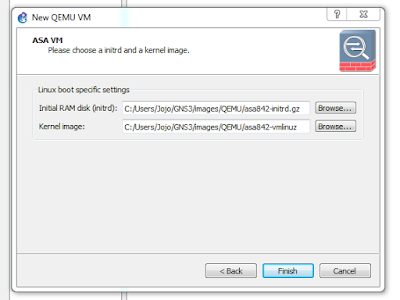
Cara menginstall cisco ASA di GNS3

Gambar
GNS3 is one of the network simulation software very useful and powerful, many network devices can be simulated, here's how to install Cisco ASA. My Practice using GNS3 1.3.3, ASA 8.4 1. Download the cisco asa source files  asa842-k8.bin   and  asa842-vmlinuz 2. Extract them and place them in the GNS3 images directory. 3. For example : C:\Users\<user name>\GNS3\images\QEMU\ 4. Go to Edit -> Preference -> QEMU -> QEMU VMs 5. Click New -> Give Name -> Set typenetwork devices can be simulated, here's how to install cisco asa

Cara menggunakan editor VI

Essential Vi Commands Open a file: #vi filename To go into edit mode: #press ESC and type I To go into command mode: #press ESC To save a file : #press ESC and type :w fileName To save a file and quit : #press ESC and type :w

How to configure IPv6 on Tiny Core Linux

I usually use Tiny Core Linux in GNS3 for testing network connectivity because it’s lightweight and boots quickly. Here’s a guide on adding IPv6 addresses and routes on Tiny Core Linux. 1. Adding an IPv6 Address There are two common ways to add an IPv6 address: a. Using ip command Usage: # /sbin/ip -6 addr add <ipv6address>/<prefixlength> dev <interface> Example: # /sbin/ip -6 addr add 2001:0db8:0:f101::1/64 dev eth0 b. Using ifconfig Usage: # /sbin/ifconfig <interface> inet6 add <ipv6address>/<prefixlength> Example: # /sbin/ifconfig eth0 inet6 add 2001:0db8:0:f101::1/64 2. Show IPv6 Address You can verify the IPv6 address assigned to an interface with either: # /sbin/ifconfig eth0 or # /sbin/ip -6 addr show dev eth0 3. Adding an IPv6 Route To add an IPv6 route via a gateway, there are two options: a. Using ip Usage: # /sbin/ip -6 route add <ipv6network>/<prefixlength> via <ipv6address> dev <device...

Cara mount, eject & safely remove flashdisk/pendrive di linux

Kalau linux yang kita install mode CLI, berikut adalah cara mount, eject & safely remove flashdisk di linux : 1. Tancapkan flashdisk/pendrive 2. #fdisk -l (untuk memeriksa letak/nama device flashdisk tersebut) 3. #mkdir /media/flashdisk  (membuat folder tempat mount flashdisk) 3. #mount /dev/sdb1 / media/flashdisk (mount flashdisk ke media/flashdisk dan sdb1 adalah nama/letak devicenya). 4. #cd /media/flashdisk (masuk dalam media flashdisk) 5. #ls (melihat isi flashdisk, disini sudah bisa mengakses isi flashdisk)

Cara reset password cisco switch

📌 Pendahuluan Pada praktik ini kita akan melakukan password recovery pada Cisco Switch 2960 menggunakan akses console. Langkah awal: Hubungkan console cable ke switch Buka terminal emulator seperti: HyperTerminal (Windows) PuTTY Minicom (Linux) ⚙️ Langkah-Langkah Password Recovery ✅ 1. Masuk ke Mode ROMMON Nyalakan switch sambil menekan tombol MODE . Lepaskan tombol setelah muncul tampilan seperti berikut di terminal: switch: Ini menandakan kita telah masuk ke ROMMON mode . ✅ 2. Inisialisasi Flash File System Jalankan perintah: switch: flash_init ✅ 3. Cek Isi Direktori Flash Untuk melihat file konfigurasi: switch: dir flash: ✅ 4. Rename atau Hapus File Config File yang menyimpan password adalah: config.text Agar konfigurasi tidak ter-load saat boot, lakukan salah satu: 🔹 Opsi Aman (Disarankan) — Rename switch: rename flash:config.text flash:config.text.old 🔹 Opsi Alternatif — Delete switch: delete flash:config.text ✅ 5. Boot Switch Setelah re...

Cara reset password MySQL

if you really forget what your mysql root password, this is just 6 easy steps to reset the password of your mysql. 1. Stop MySQL service #/etc/init.d/msql  stop 2. Start MySQL safe mode #mysqld_safe --skip-grant-tables  & Output : [1] 5988 Starting mysqld daemon with databases from /var/lib/mysql mysqld_safe[6025]: started Press anykey 3. Connect to mysql server using mysql client: #mysql -u root Now you are not asked to enter a password Output : Welcome to the MySQL monitor.  Commands end with ; or \g. Your MySQL connection id is 1 to server version: 4.1.15-Debian_1-log Type 'help;' or '\h' for help. Type '\c' to clear the buffer. mysql>